TikTok LIVEBuilt by a streamer

Let TikTok viewers control your screen.

ViewerTap turns TikTok LIVE activity into stream effects. Start with Blur Beta, or order a custom streamer tool built around your stream.

Build a Custom Tool

Windows beta. Likes and follows are the triggers. $25 gets you in, with 3 months of fixes and setup help included.

blur-beta — fortnite capture
Real capture
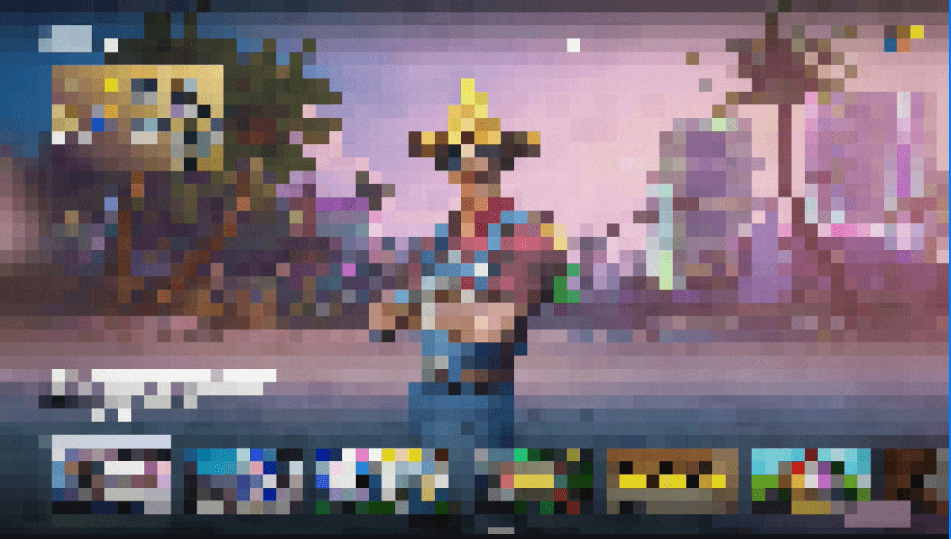
Fortnite lobby screen heavily blurred by Blur Beta during a streamBlur active — viewers did this
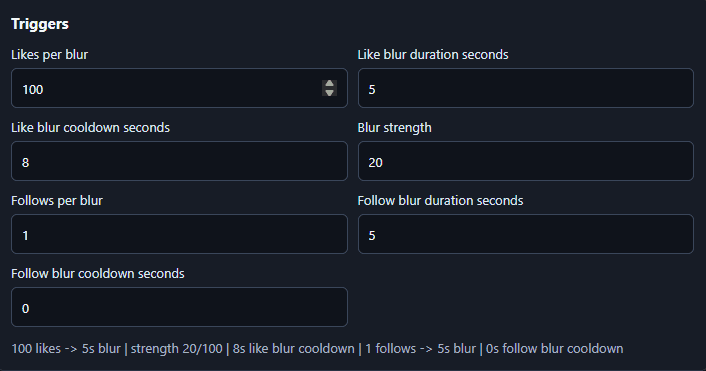
100 likes → 5s blur · strength 20/100 · 8s cooldown · 1 follow → 5s blur

Fortnite lobby with Blur Beta running. Straight from the beta build — not a mockup. See the real controls

Blur Beta$25 · beta access

Each follower can blur your screen.

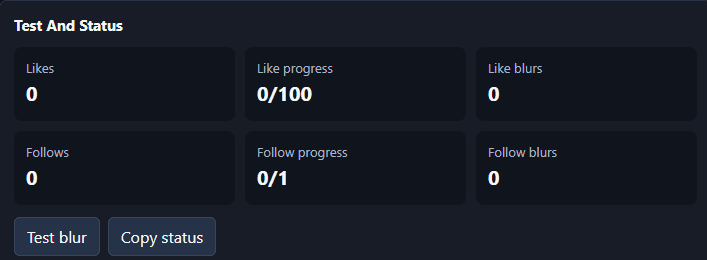
Likes can build toward blur too. Set the thresholds, cooldowns, duration, and blur strength before you go live, then hit Test blur so you know exactly what viewers can do to you.

  • TikTok LIVE intake
  • Follows trigger blur
  • Likes build toward blur
  • Thresholds you control
  • Cooldowns and duration
  • Blur strength dial
Beta details

Includes 3 months of bug-fix updates and setup support. Secure delivery unlocks after checkout.
Custom Streamer Toolsscoped per stream

Want chat triggering hotkeys, sounds, or game effects?

I build premium setups around your stream: OBS actions, overlays, custom chaos, and control panels shaped to how you actually go live. Safety limits are built in, so viewers get influence, not the keys.

  • TikTok intake
  • Twitch intake on custom orders
  • OBS actions and hotkeys
  • Sounds and overlays
  • Game-specific actions
  • Safety limits and cooldowns

Premium pricing, scoped after a short discovery conversation. This is not off-the-shelf work, so there is no instant checkout.

How Blur Beta works

Four steps between you and screen chaos.

01

Connect TikTok LIVE

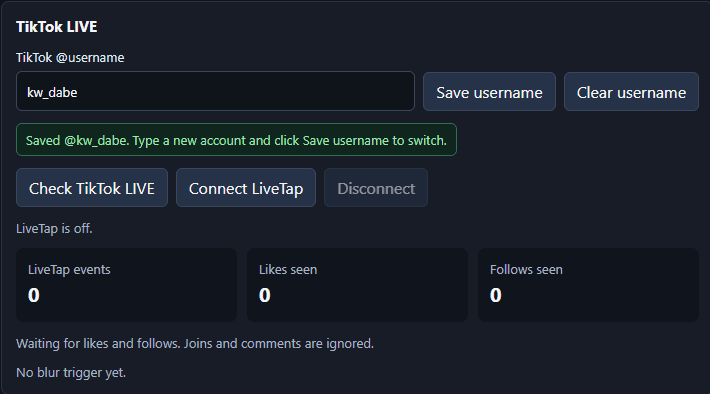
Save your @username and connect LiveTap. Likes and follows start counting the moment you are live.

02

Pick your triggers

Choose how many likes build one blur, and whether every new follow fires one instantly.

03

Tune the blur

Set duration, cooldown, and blur strength so the chaos stays playable instead of unwatchable.

04

Go live

Viewers fight your screen. You play through it. Test blur first so nothing surprises you.

Real beta controls

Straight from the current build.

Actual screenshots of the Windows beta you get today — not concept art, not a dashboard render.

blur-beta / triggersBeta UI
Blur Beta triggers panel with likes per blur, follows per blur, duration, cooldown, and blur strength fields
Set exactly how many likes or follows trigger blur — plus duration, cooldown, and strength.
blur-beta / tiktok-liveBeta UI
TikTok LIVE panel with saved username, LiveTap connect buttons, and counters for events, likes, and follows
Connect your TikTok LIVE username and watch likes and follows come in.
blur-beta / test + statusBeta UI
Test and status panel showing like progress, follow progress, blur counts, and Test blur and Copy status buttons
Test your blur before going live, then track exactly what triggered during stream.

Custom builds

Need something built around your stream?

One-off tools for streamers who want chat doing more than watching. Scoped around your game, your platform, and your rules — every build ships with safety limits and cooldowns.

TikTok intakeTwitch intake availableSafety limits included
Request a Custom Build

A request starts a scoping conversation, not a checkout. You get a plan and a quote before anything is built.

  1. 01Chat triggers OBS scene changes
  2. 02Gifts trigger sounds or overlays
  3. 03Follows trigger chaos effects
  4. 04Twitch or TikTok events trigger hotkeys
  5. 05Game-specific stream mechanics
  6. 06Custom control panels for mods and operators
VT

Built by a streamer

ViewerTap is built by Dabe, a streamer who uses these tools live.

The goal is not another generic overlay pack. It's stream mechanics that actually make viewers interact, and everything here runs on a real stream before it gets sold to yours.

Watch it used live — @kw_dabe on TikTok

TikTok examples

Clips are coming soon.

Blur Beta clips, viewer reactions, and live setup walkthroughs will go here. Real streams only — nothing staged.

Blur Beta clips

Coming soon

Viewer reactions

Coming soon

Setup walkthroughs

Coming soon

Get Blur Beta

$25, with 3 months of bug-fix updates and setup support. Use your secure delivery link after checkout.

Request a Custom Tool

Tell me your platform, your game, and what viewers should control. You get a scope and a quote — then it gets built.

Request a Custom Tool