Blur Beta · TikTok LIVE
Each follower can blur your screen.
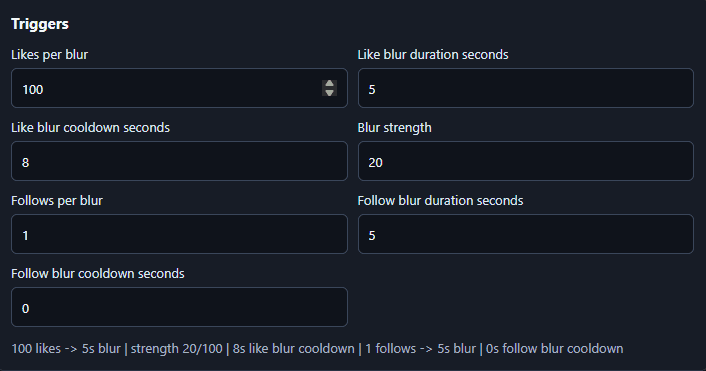
Likes can build toward blur too. Set the thresholds, cooldowns, duration, and blur strength before you go live — Blur Beta turns TikTok LIVE activity into a screen your viewers can fight over.
Windows beta, built for OBS and TikTok Live Studio setups. Two-PC friendly.
What you're buying
Early access, fixes, and setup help. Nothing imaginary.
Blur Beta is beta software. If a supported Windows or TikTok LIVE setup breaks because of the app, the beta includes 3 months where blockers get fixed or worked around. No fake account system, no pretend enterprise tier.
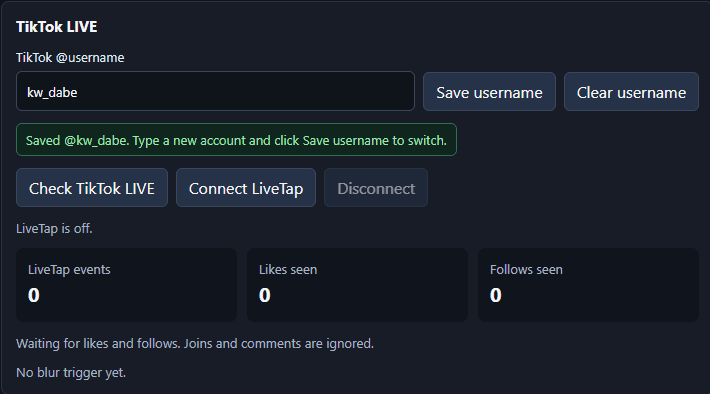
Follows and likes are the blur triggers. Joins and comments are ignored.
You set likes per blur, follows per blur, duration, cooldown, and blur strength.
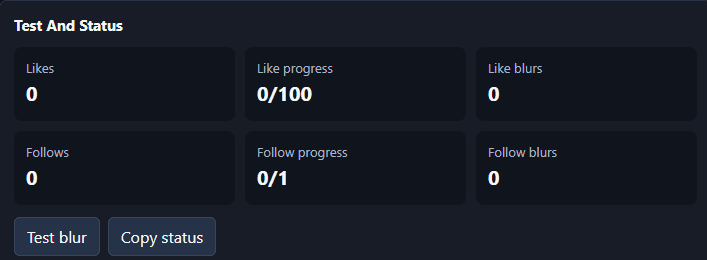
Test blur and Copy status are built in, so you can check everything before going live.
Beta access is $25 through Stripe and includes 3 months of bug-fix updates and setup support.
Delivery uses a secure download link after payment once your checkout session is verified.
The signed Windows installer is delivered through private access links, not a public raw ZIP.
Promo copies are limited and approved by hand for creators who credit ViewerTap.
Before you go live
Connect, test, then let viewers loose.
Free starter betas
Useful, but not the main event.
These stay free and open. Blur Beta is the paid product because it is the effect viewers already react to on stream.